


Motalabatech
Platform
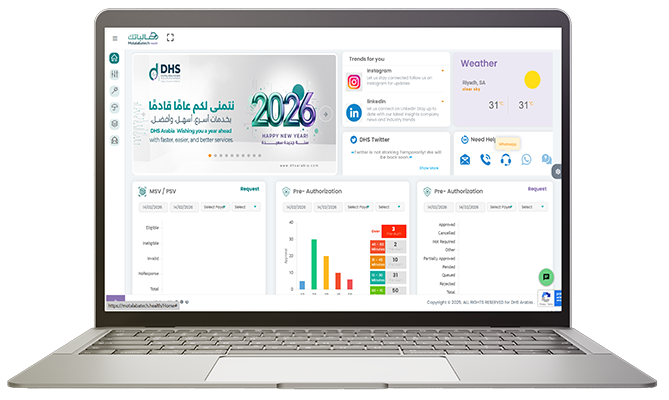
Motalabatech by DHS Arabia is a unified insurance transaction and interoperability platform built to fully manage and automate the end to end exchange between healthcare providers and payers. The platform orchestrates the complete insurance transaction lifecycle, including eligibility, pre authorization, claims, resubmissions, and reconciliation. It is fully aligned with NPHIES, CHI, CNHI ,HHC ,IA ,NCHI and SHC standards, ensuring regulatory compliance by design.
Motalabatech goes beyond basic integration by embedding advanced validation layers, change request management, and rule based controls to detect errors early, reduce rejections, and enforce payer and regulator requirements before submission.
This includes structural, business, and policy level validations to ensure clean and compliant transactions. The result is a single, scalable platform that improves transaction accuracy accelerates processing, reduces operational friction, and enables seamless interoperability across the Saudi health insurance ecosystem.

Talk to Our Team
FAQ
Q1. How do I log in to the Motalabatech Portal?
A1. You will receive your login email and password after your onboarding process with DHS is complete.
Open the portal link, enter your credentials, and click Login.
Q2. What should I do if I forget my password?
A2. You must contact your facility’s main authorized admin, only they can reset your password.
Q3. How do I add or edit users?
A3. Go to Control Center → User Management.
Only the main authorized user—or anyone given user management permission—can add, edit, or deactivate user profiles.
Q4. How can I add a physician or upload multiple physician records?
A4. Use Physician Management to add one physician manually or download the Excel template to upload multiple physicians at once.
Q5. What is the “Fetch Data” feature used for?
A5. It allows facilities to add claims either through direct integration with their HIS system or by uploading the DHS Excel template.
Q6. What does “Invalid” or “Invalid by DHS” mean for a claim?
A6. It means the claim has errors. You must open the claim issue, fix the problem, and then select Second Response to return the claim to Valid status.
Q7. How do I modify or follow up on an existing pre-authorization request?
A7. Go to Pre-auth History, open the Actions menu, and choose Follow Up to add or remove services, then resubmit the updated request.
Q8. How do I view previously submitted MSV/PSV eligibility requests?
A8. Go to MSV/PSV History, choose the payer and date range, then click Search.
Q9. Can I export data from the portal?
A9. Yes, Claims, Pre-authorizations, MSV/PSV history, and Dashboard statistics can all be exported to Excel.
Q10. How do I contact customer support?
A10. Under Help & Support, you can access the DHS hotline, email address, mailing address, and social media contacts.
Q11. How can I submit a pre-authorization request directly from an eligibility result?
A11. From MSV/PSV History, click Submit Preauthorization in the Actions menu. The system automatically fills in the member’s information.
Q12. How can I track payments received from insurance companies?
A12.Go to Claims → Payment, where you can filter payments by payer name, payment status, claim number, or date range.